
HIPAA Training & How I Protect Patient Information
I completed HIPAA compliance training so the “how we handle patient information” conversation with practice IT and managers can start with factsnot vibes, not a mystery binder labeled policies??.
This page is for practices evaluating a HIPAA trained remote chart prep nurse: what I studied, what the certificate says, and how those expectations show up in day-to-day chart prep. Privacy stays serious. Paperwork humor stays about sticky notes and PDFs never about patients.
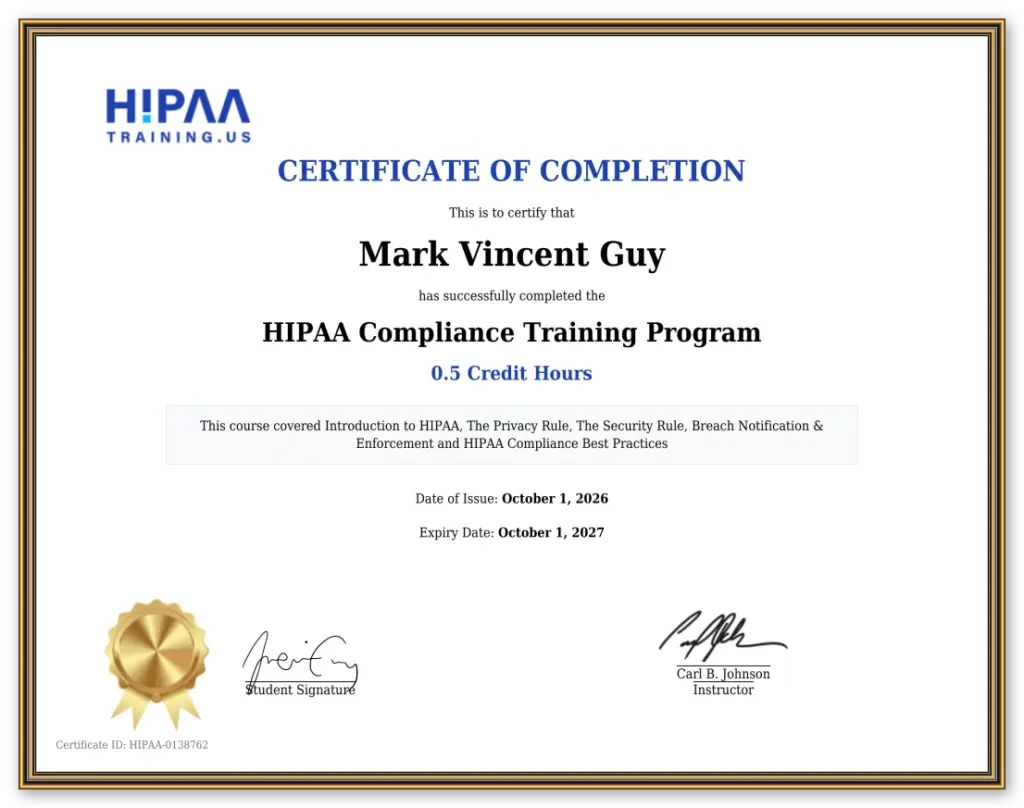
Certificate Summary
I hold a HIPAATraining.us Certificate of Completion for finishing the HIPAA Compliance Training Program (0.5 Credit Hours). The program covered Introduction to HIPAA, The Privacy Rule, The Security Rule, Breach Notification & Enforcement, and HIPAA Compliance Best Practices.
Name on certificate: Mark Vincent Guy
Date of Issue: October 1, 2026
Expiry: October 1, 2027
Certificate ID: HIPAA-0138762
Instructor: Carl B. Johnson
HIPAA sets national rules for protecting health information. For a HIPAA trained remote chart prep nurse supporting a U.S. practice, the useful parts are practical: what counts as protected information, who may use or share it, how systems should be safeguarded, and what happens if something goes wrong. Authoritative overviews live on hhs.gov/hipaa the source practices and IT teams already know.
The Privacy Rule
In plain terms, the Privacy Rule is about who may use or disclose protected health information, and for what purposes. Training reinforced minimum necessary use, role-based access, and keeping patient information out of casual channels. Translation for chart prep: PHI stays in the practice’s authorized systems not in a random email thread, not in a website inquiry, not on a sticky note that escapes the building.
The Security Rule
The Security Rule focuses on electronic protected health information administrative, physical, and technical safeguards. For remote work, that means access controls, authentication, and connecting only through paths the practice approves. It is less “vibes” and more “doors, keys, and who is on the guest list.”
Breach Notification & Enforcement
Training also covered breach notification expectations and enforcement themes: if unsecured PHI is compromised, covered entities have specific responsibilities. My lane is prevention and practice-controlled access not improvising incident response. If something looks wrong, it escalates through the practice’s process. Best practices wrapped the course: least privilege, need-to-know, careful handling of screens and files, and never treating PHI like ordinary office chatter. Useful for anyone doing HIPAA training for remote medical staff and for practices that want remote prep without mystery access patterns.
How I Apply it Day to Day
Training only matters if the workflow matches. Here is how chart prep with me is set up using the same access facts already published on this site:Lorem ipsum dolor sit amet, consectetur adipiscing elit. Ut elit tellus, luctus nec ullamcorper mattis, pulvinar dapibus leo.
PHI Stays Put
Patient information is handled only in the practice’s authorized systems not through the website, and not in an initial inquiry.
Paperwork Before Records
A signed Business Associate Agreement (BAA) and the practice’s written OK for remote access come before any patient records are touched.
My Own Least-Privilege Account
The practice creates my individual user account with only the access needed for agreed chart-prep work.
One Fixed US Static IP
I connect from my own dedicated US static IP; practice IT can allowlist that single address.
Separate Setup Per Practice
Each client’s IP/access setup stays separate no mixed guest lists.
Prep for Authorized Provider Review
Work is chart preparation for an authorized provider to review, verify, and decide.
Practice 2FA
Logins use the practice’s two-factor authentication.
You can Review or Revoke Access
Access remains under practice control.
For the IT-facing walkthrough static IP, allowlisting, access method, Windows if required see Accessing your EHR. For a general business conversation (no patient data), use Contact or book time below.
FAQ
Quick answers on training, when records are touched, and how EHR access is set-up tied to the certificate and day-to-day practices above.
Are you HIPAA Trained and Certified?
Yes. I’m HIPAA trained and certified through HIPAATraining.us I completed their HIPAA Compliance Training Program (certificate ID HIPAA-0138762, issued October 1, 2026, valid through October 1, 2027). You can view the certificate above.
When do you touch Patient Records?
Only after a signed BAA and the practice’s written OK for remote access and only inside systems the practice authorizes. Please do not send patient names, charts, or screenshots in an initial inquiry.
How do you connect to our EHR?
From my fixed dedicated US static IP, on your approved access method, under my own least-privilege account with your 2FA after allowlisting and paperwork. Details: Accessing your EHR.
Can our Practice Revoke Access?
Yes. Access is practice-controlled. You can review or revoke my account anytime.
Talk through Access and Chart Prep
If you want a HIPAA trained remote chart prep nurse who can walk IT through IP allowlisting and least-privilege accesswithout sending charts into the void book a discovery call. General business only.
